That disc from that day,
now unreadable.
Parts of it may still be readable.
Some discs cannot be recovered.
A Windows app that takes video, music and files off school sports-day Blu-ray discs, wedding DVDs and old music CDs, starting with the parts that can still be read. It never writes to the original disc.
Coming soon. Please wait until the Microsoft Store listing is available.
See how it works
Three steps
-
Put the disc in and check it Free
The app only reads the disc to check its condition, then tells you roughly how much might come back.
-
Take out what can be read Paid version
Videos you can watch are added to a list one by one. If you stop, what has been read so far is kept.
-
Check it, then save Paid version
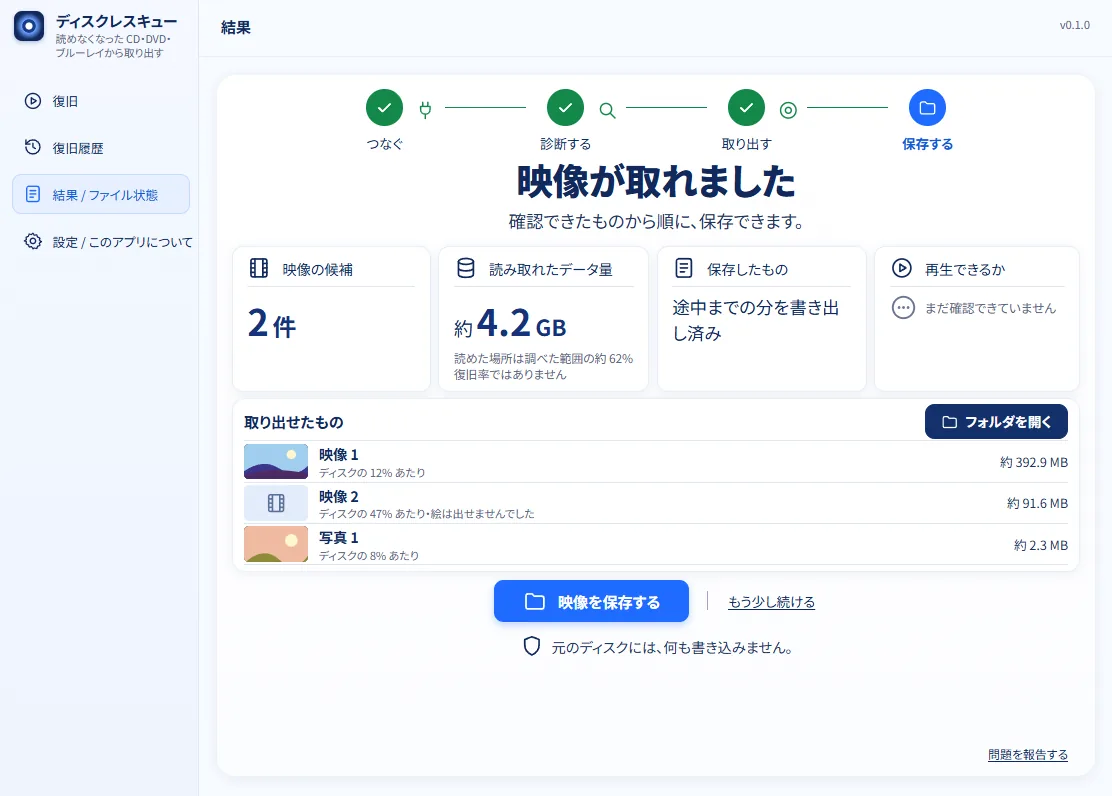
You look at what was taken out, and then save it.
An actual screen (the list of what was taken out)
The price: only the paid version, which takes out and saves
JPY 980
Launch price (until January 15, 2027)
Planned regular price JPY 3,950, one-time purchase
Checking a disc is free (Disc Rescue Lite).
Honest limits
- Some discs cannot be recovered. Sometimes only part of the data comes back, and gaps or glitches may remain.
- For a music CD, the spots that could not be confirmed are left silent, and the app shows them track by track.
- Reading for a long time may put a weak disc or the drive under strain.
- If your drive does not recognize the disc at all, a professional data recovery service is a better fit.
When a disc will not read
- A sports-day or wedding DVD or Blu-ray will not open, or stops partway
- An old music CD will not load, or skips
- A CD-R with photos or files will not open (including CD-R discs written in several sessions, and CD-R discs whose writing was never finished)
- The disc has scratches or dirt, and you want at least the readable parts
The contents of your disc are not sent out. The free Lite version can send only a problem report that you choose to send yourself. Only when you save a music CD with the paid version, the app compares a string of numbers like the disc's table of contents with an online record, and may be able to repair spots that scratches made unreadable (you can turn this off in Settings). For details, see the Privacy Policy.
If it stops, it picks up where it left off
After a power cut or a forced shutdown, you can resume from where it stopped the next time you start the app. What was already read is kept.
When a disc does not read well
The app suggests what to try next, such as wiping the disc or trying another drive. You can also send a problem report (optional, and available in the free version too; the contents of your disc are not sent).
What it is for
This software is for discs you filmed or recorded yourself, and CDs you own, for your own use. It cannot remove copy protection (CSS, AACS, CPRM and the like), and it cannot take data off copy-controlled CDs (CCCD).
More
Language of the app: the screens of Disc Rescue are available in Japanese and English only. Pages of this site that are not translated yet are in Japanese.